Casual Resource Hub
A&S HR has crafted a comprehensive resource hub for students seeking casual positions to support you at every stage of the process.
Eligibility:
- Columbia University, Barnard, and Teachers College students currently enrolled at least half-time and in good academic standing
- Columbia University students will be hired as Student Casuals
- Barnard and Teachers College students will be hired as Non-Student, Short-Term Casuals
Hiring and Onboarding
Once A&S HR has been notified of your offer, a member of the team will contact you with a welcome email and instructions on initiating your hiring process. You will also receive a separate email from DocuSign inviting you to complete required hiring documents. Please complete these hiring documents at your earliest convenience. The packet will include:
- Personal Information Sheet – If your home address is outside the New York Tri-State Area (New York, Connecticut, New Jersey), a NYS mailing address needs to be listed on the form.
- Tax Forms – These forms must contain your home address.
- W-4 - All employees need to complete this form.
- IT-2104 - If the employee is a resident of New York State.
- IT-2104.1 - If the employee is not a resident of New York State.
- IT-2104-E - If the employee meets all the conditions to claim exemption from withholding. The criteria are listed at the top of the form.
- Paid Family Leave
- Voluntary Self-Identification of Race and Ethnicity Form
- Work Authorization: If you are an international student, you must provide proof of your US work authorization. Depending on your visa type, you will need to upload certain documents along with your hiring documents in DocuSign.
International students must provide proof of US work authorizations. Depending on visa type, there are certain documents students must upload along with their hiring documents in Docusign:
- Permanent Residents: Copy of P.R. card (form I-551, front and back)
- F-1: Passport biographical page, Visa, I-94, I-20. If on OPT, include copy of I-766 or receipt for OPT-STEM only
- J-1: Passport biographical page, Visa, I-94, DS2019
- H-1: Passport biographical page, Visa, I-94, I-797
- O-1: Passport biographical page, I-94, I-797, and if applicable, I-129
- TN: Passport biographical page, I-94, I-797
All employees must provide proof of eligibility to work in the US by completing Form I-9 no later than the third day of employment.If your I-9 is not completed within that timeframe, you will not be allowed to work. A&S HR will confirm if you have an active I-9 on file with the University. To complete the I-9:
- Part 1: is completed online
- Part 2: Must be completed in person. The University offers two locations:
- Manhattanvile Campus: Studebaker Building, CU Human Resources, 4th Floor, 615 West 131st Street (Monday - Friday, 9 a.m. - 4:30 p.m.)
- Morningside Campus: Kent Hall: By Appointment Only
You must present unexpired, acceptable documents to complete part 2 of the I-9. The list of acceptable documents for your appointment can be found on the U.S. Citizenship and Immigration Services website.
Compensation
Once you have completed your I-9 and are active in PAC, you can set up direct deposit. If direct deposit is not set up, a paper check will be mailed to the address on file. To set up direct deposit:
- Visit my.columbia.edu
- Click on People@Columbia and log in with your uni and password
- Navigate to the “Faculty & Staff” Page
- Under “Personal Data Tab”, choose “View and/or Update Personal Data”
- Select “Payroll & Compensation
- Select “Direct Deposit”
- Click the “+” button to add bank account information

As a casual employee, you are required to submit a weekly timesheet for all hours worked, in the University's Time and Attendance System (TLAM). Your timesheet must be reviewed and approved by your supervisor, PI, or designated delegate. Steps to submit your timesheet:
- Visit my.columbia.edu
- Log in with UNI and password
- Select the “Time” title.
- Select “Timesheet”.
- Make sure the correct pay period is selected. If not, click “Previous Period” or “Next Period” accordingly.
- Enter the “In” and “Out” times accordingly. The hours worked will be calculated based on the times entered.
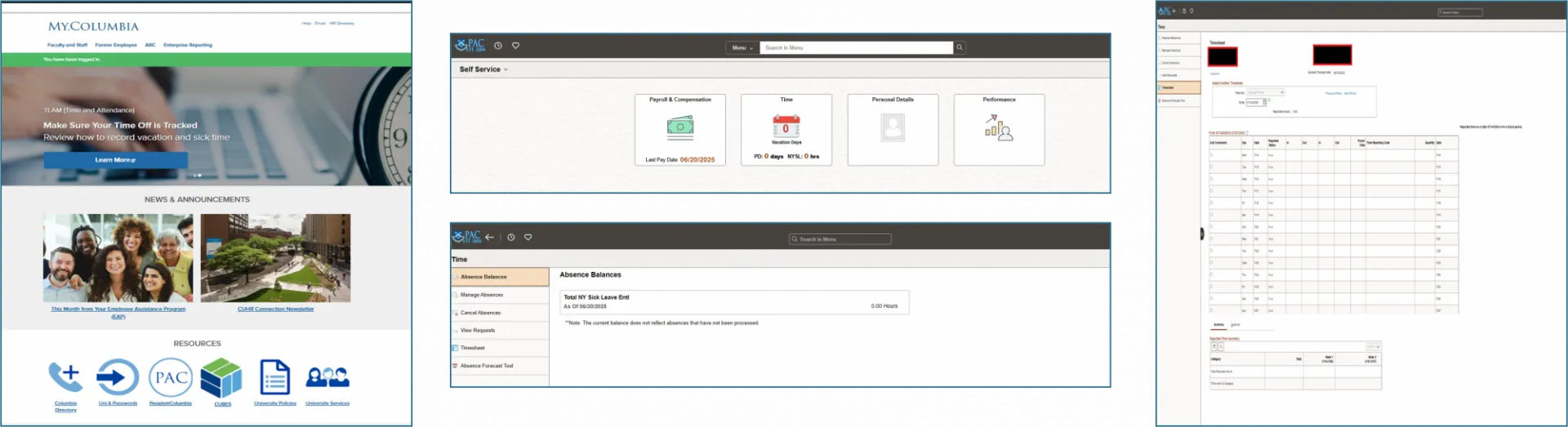
You will be paid on a biweekly basis, with pay dates occurring every other Friday. Please refer to the University Payroll calendars for specific dates.
Non-student short-term casual employees are eligible for overtime (at time and one-half their regular hourly rate) for hours worked in excess of 40 hours per week. Please note that student casuals are capped at 20 hours per week across all positions during the fall/spring semesters.
Schedules and Work Policies
Student casuals can work up to 20 hours per week across all positions during the spring and fall semester. Students must inform their department and A&S HR if they hold another position within the University.
Student casuals can work up to 35 hours per week across all positions during the summer semesters. Students must inform their department and A&S HR if they hold another position within the University.
Student casuals are not permitted to work remotely. Please refer to the university policy on remote work for more information.
Non-student short-term casuals are limited to a maximum of 560 hours or 4 months from the initial hire date, whichever comes first, in a 12 month period. This limited duration does not apply to students who are enrolled half time or more at Columbia University, Barnard College, or Teacher's College.
Any non-student short-term casual employee who has worked the maximum number of hours/months within 12-months of their hire date may not be employed as a short-term casual employee anywhere within the University for 12 months from their termination date.
For more information on Casual employment at Columbia, please contact A&S HR or refer to the University's policy on casual employees.